Friday, 27 November 2020

Changing the name of a variable in CMake

 Here's a neat trick in CMake: you want to change the name of a variable, but worry that anyone you've distributed the code to already will lose the option they've selected.

Use the old variable as the default value for the new one:

option(OLD_VARIABLE "Some variable" ON)
option(NEW_VARIABLE "Some variable" ${OLD_VARIABLE})

or...

set( OLD_STRING_VARIABLE "Old default" CACHE STRING "Help text" )
set( NEW_STRING_VARIABLE "${OLD_STRING_VARIABLE}" "Help text" )

Thursday, 12 November 2020

Passing an array of structs from C++ to C#

To pass an array of structs from C++ to C#, you can pass a pointer to a C-style array. In C++ you may have a struct, e.g.


#pragma pack(push)
#pragma pack(1)
struct InputEvent
{
uint32_t eventId;
float floatValue;
uint32_t intValue;
};
#pragma pack(pop)

The delegate in C++ is:
typedef void(__stdcall* ProcessNewInputFn) (int numEvents, const InputEvent**); Telling C++ what C# function to call: 

 
extern "C" __declspec(dllexport) void SetInputProcessingDelegate(ProcessNewInputFn newInputProcessing)
{
processNewInput = newInputProcessing;
}

Using this from C++

std::vector<InputEvent> inputEvents;
const avs::InputEvent *v=inputEvents.data(); processNewInput(inputEvents.size(), &v); 

In C# the struct is defined as:

[StructLayout(LayoutKind.Sequential, Pack = 1)]
public struct InputEvent
{
public UInt32 eventId;
public float floatValue;
public UInt32 intValue;
}; 


Note the packing! It must match what we had in C++. Now C# must declare the the delegate type it will implement:

[UnmanagedFunctionPointer(CallingConvention.StdCall)] delegate void OnNewInput(int numEvents, in IntPtr newEvents); 


And declare in C# the C++ function that sets the delegate:

[DllImport("dllname")] static extern void SetInputProcessingDelegate(OnNewInput onNewInput );


This is called with

ok = SetInputProcessingDelegate(ProcessingClass.SetInput); 


Where we have a class like this:


class ProcessingClass
{
public static void StaticProcessInput(int numEvents, in IntPtr inputEventsPtr )
{
    int EventSize = System.Runtime.InteropServices.Marshal.SizeOf(typeof(avs.InputEvent));
    avs.InputEvent[] inputEvents = new avs.InputEvent[inputState.numEvents];
    IntPtr ptr=  inputEventsPtr;
    for (int i = 0; i < inputState.numEvents; i++)
    {
       inputEvents[i]=Marshal.PtrToStructure<avs.InputEvent>(ptr);
       ptr += EventSize;
}
        }
}


Here, we take the C++ style pointer-to-array, and iterate through the array elements, copying each in turn into the C# style array.

Thursday, 14 November 2019

Resolving conflicts between Qt versions

The trueSKY plugin for Unreal uses Qt dll's for UI. Unfortunately so do some other plugins. Because Windows just uses whichever version of a dll was loaded first, this leads to (for example) crashes in trueSKY UI because it tries to access the wrong parts of a dll loaded by Quixel Megascans.

To solve this we recompile Qt using the switch  -qtlibinfix to modify the output filenames. Thus instead of Qt5Core.dll we get Qt5Core_simul.dll etc.

No more conflicts!

UPDATE: To compile Qt, follow the instructions at https://wiki.qt.io/Building_Qt_5_from_Git. For example, for me on Windows, I must git-clone the repo, install perl (!) and call perl init-repository.

Then, I create a subdirectory BUILD_DIR at subdirectory "build/x64". From there, I call:

call ../../configure.bat -qtlibinfix %QT_INFIX% -prefix %BUILD_DIR%\qtbase -skip qtwebengine -developer-build -%reldeb% -force-debug-info -no-warnings-are-errors  -L kernel32 -opengl desktop -opensource -make libs -make tools -nomake examples -nomake tests -platform win32-msvc -confirm-license -no-compile-examples -qt-zlib -plugin-manifests -no-angle -qt-freetype -qt-libjpeg -qt-libpng -D U_STATIC_IMPLEMENTATION %INC% %LIBDIRS% %IC%

QT_INFIX is _simul, while INC LIBDIRS and IC are extra compile options.

Finally, we run nMake to build Qt.

Thursday, 2 August 2018

Finding and removing files added to git by accident

If for example, you've added lib files by mistake to a large git repo, and want to remove them, but don't know the exact paths, use this:

git ls-files *.lib>lib.bat

Then in lib.bat you may have e.g.:
Plugins/Media/Intermediate/Build/Win64/DebugMediaEditor/MediaEditor-Win64-Debug.lib

Add git rm --cached to the front of each line, then run the batch file and commit the result.

Thursday, 21 June 2018

How to make a custom Wizard for Unreal Editor

I wanted to create a wizard in the trueSKY Unreal plugin that would make it easier for users to add trueSKY to UE scenes. I was following this video where Epic's Michael Noland describes various ways to modify the Editor. So I made a custom Property Editor window with settings to select a sky sequence, create a TrueSkyLight etc.

But it didn't look very friendly. And implementing a wizard-style Apply button just put a button in amongst the other settings - not great. After some searching in the UE codebase, I discovered the SWizard class that Unreal Editor uses for its own wizards. Here's what you do:

1. Create a class derived from SCompoundWidget containing a TSharedPtr<SWizard>. Mine looks like this:


DECLARE_DELEGATE_FourParams( FOnTrueSkySetup, bool, ADirectionalLight* ,bool, UTrueSkySequenceAsset *);
#define S_DECLARE_CHECKBOX(name) \
 bool name; \
 ECheckBoxState Is##name##Checked() const { return name ? ECheckBoxState::Checked:ECheckBoxState::Unchecked;} \
 void On##name##Changed(ECheckBoxState InCheckedState) {name=(InCheckedState==ECheckBoxState::Checked);}

class STrueSkySetupTool : public SCompoundWidget
{
public:
 SLATE_BEGIN_ARGS( STrueSkySetupTool )
  :_CreateTrueSkyLight(false)
  ,_DirectionalLight(nullptr)
  ,_CreateDirectionalLight(nullptr)
  ,_Sequence(nullptr)
 {}
 /** A TrueSkyLight actor performs real-time ambient lighting.*/
 SLATE_ARGUMENT(bool,CreateTrueSkyLight)
 /** TrueSKY can drive a directional light to provide sunlight and moonlight.*/
 SLATE_ARGUMENT(ADirectionalLight*,DirectionalLight)
 /** If there's no directional light in the scene, you can create one with this checkbox.*/
 SLATE_ARGUMENT(bool,CreateDirectionalLight)
 /** The TrueSKY Sequence provides the weather state to render.*/
 SLATE_ARGUMENT(UTrueSkySequenceAsset *,Sequence)
 /** Event called when code is successfully added to the project */
 SLATE_EVENT( FOnTrueSkySetup, OnTrueSkySetup )
 SLATE_END_ARGS()
 /** Constructs this widget with InArgs */
 void Construct( const FArguments& InArgs );
 
 /** Handler for when cancel is clicked */
 void CancelClicked();

 /** Returns true if Finish is allowed */
 bool CanFinish() const;

 /** Handler for when finish is clicked */
 void FinishClicked();

...
 
 S_DECLARE_CHECKBOX(CreateTrueSkyLight)
 S_DECLARE_CHECKBOX(ShowAllSequences)

 void SetupSequenceAssetItems();
 
 void CloseContainingWindow();
private:
 /** The wizard widget */
 TSharedPtr<SWizard> MainWizard;
 FOnTrueSkySetup OnTrueSkySetup;
...
};


The SLATE_ARGUMENT macros allow initialization of named parameters in this style:

TSharedRef<STrueSkySetupTool> TrueSkySetupTool = SNew(STrueSkySetupTool).OnTrueSkySetup(OnTrueSkySetup1).CreateTrueSkyLight(true);

etc. This is super-useful.

2. Create a callback for the wizard to execute:
FOnTrueSkySetup OnTrueSkySetupDelegate;

3. Create a window for the widget. This function is called when the menu option to start the wizard is selected:

void FTrueSkyEditorPlugin::OnAddSequence()
{
 TrueSkySetupWindow = SNew(SWindow)
   .Title( NSLOCTEXT("InitializeTrueSky", "WindowTitle", "Initialize trueSKY") )
   .ClientSize( FVector2D(600, 550) )
   .SizingRule( ESizingRule::FixedSize )
   .SupportsMinimize(false).SupportsMaximize(false);
 OnTrueSkySetupDelegate.BindRaw(this,&FTrueSkyEditorPlugin::OnTrueSkySetup);
 TSharedRef TrueSkySetupTool = SNew(STrueSkySetupTool).OnTrueSkySetup(OnTrueSkySetupDelegate);
 TrueSkySetupWindow->SetContent( TrueSkySetupTool );

If the main frame exists parent the window to it. The main frame should always exist...

 TSharedPtr< SWindow > ParentWindow;
 if( FModuleManager::Get().IsModuleLoaded( "MainFrame" ) )
 {
  IMainFrameModule& MainFrame = FModuleManager::GetModuleChecked<imainframemodule>( "MainFrame" );
  ParentWindow = MainFrame.GetParentWindow();
 }
 
 bool modal=false;
 if (modal)
 {
  FSlateApplication::Get().AddModalWindow(TrueSkySetupWindow.ToSharedRef(), ParentWindow);
 }
 else if (ParentWindow.IsValid())
 {
  FSlateApplication::Get().AddWindowAsNativeChild(TrueSkySetupWindow.ToSharedRef(), ParentWindow.ToSharedRef());
 }
 else
 {
  FSlateApplication::Get().AddWindow(TrueSkySetupWindow.ToSharedRef());
 }
 TrueSkySetupWindow->ShowWindow();
}
4. Implement the setup tool:
BEGIN_SLATE_FUNCTION_BUILD_OPTIMIZATION
void STrueSkySetupTool::Construct( const FArguments& InArgs )
{
 OnTrueSkySetup = InArgs._OnTrueSkySetup;
 CreateTrueSkyLight=InArgs._CreateTrueSkyLight;
 DirectionalLight=InArgs._DirectionalLight;
 Sequence=InArgs._Sequence;
...

The interface to build the actual UI is really interesting. By overloading the [] and + operators, Epic lets you specify the widget structure like so:


 ChildSlot
 [
  SNew(SBorder)
  .Padding(18)
  .BorderImage( FEditorStyle::GetBrush("Docking.Tab.ContentAreaBrush") )
  [
   SNew(SVerticalBox)
   +SVerticalBox::Slot()
   [
    SAssignNew( MainWizard, SWizard)
    .ShowPageList(false)
    .CanFinish(this, &STrueSkySetupTool::CanFinish)
    .FinishButtonText(  LOCTEXT("TrueSkyFinishButtonText", "Initialize") )
    .OnCanceled(this, &STrueSkySetupTool::CancelClicked)
    .OnFinished(this, &STrueSkySetupTool::FinishClicked)
    .InitialPageIndex( 0)
    +SWizard::Page()
    [
     SNew(SVerticalBox)
     +SVerticalBox::Slot()
     .AutoHeight()
     [
      SNew(STextBlock)
      .TextStyle( FEditorStyle::Get(), "NewClassDialog.PageTitle" )
      .Text( LOCTEXT( "WeatherStateTitle", "Choose a Sequence Asset" ) )
     ]
     +SVerticalBox::Slot()
     .AutoHeight()
     .Padding(0)
     [
      SNew(SHorizontalBox)
      +SHorizontalBox::Slot()
      .FillWidth(1.f)
      .VAlign(VAlign_Center)
      [
       SNew(STextBlock)
       .Text(LOCTEXT("TrueSkySetupToolDesc", "Choose which weather sequence to use initially.") )
       .AutoWrapText(true)
       .TextStyle(FEditorStyle::Get(), "NewClassDialog.ParentClassItemTitle")
      ]
     ]
    ]
    +SWizard::Page()
    [
     ...
    ]
   ]
  ]
 ];

}

So by adding new +SWizard::Page() elements we add pages to the wizard.

5. Finally, implement the callback that the delegate calls when you click "Finish":

void FTrueSkyEditorPlugin::OnTrueSkySetup(bool CreateDirectionalLight, ADirectionalLight* DirectionalLight,bool CreateTrueSkyLight,UTrueSkySequenceAsset *Sequence)
{
...
}

The end result looks like this:


Full source for this is at our UE branch, (register at Simul to access).

Tuesday, 10 April 2018

Signing installers with certificates

Windows Defender has recently decided to falsely mark all of our installers as containing some virus or other.

It'll be a long long while before they get around to questioning whether their algorithms are in fact, "full of it", as they say, so let's see what happens if we sign our executables using a root certificate.

First, get a certificate, from Comodo. This takes weeks while they check whether an arbitrary non-governmental organization, Dun and Bradstreet, regards your company as genuine. Just check with Companies House? Way too simple!

So you need to get a DUNS number from D&B, then buy a certificate from tucows/Comodo.

After jumping through their hoops (which don't seem to be very secure to me, just cumbersome), you'll get a .crt file.

Then https://support.citrix.com/article/CTX221295 will tell you how to convert your crt to a pfx.

Finally, use the pfx and signtool.exe (in the Windows SDK) to sign your executable.

Friday, 17 November 2017

Building Unreal Engine projects from the solution using MSBuild

If you want to use MSBuild to build UE4 projects, but need to build them from within the solution instead of specifying the vcxproj file (which doesn't always work correctly), you need to use the "Target" /t: command line parameter, like so:

"path to MSBuild.exe" /t:Engine\UE4 /p:Configuration="Development Editor" /p:Platform=Win64 UE4.sln

Key things to note:
  • the configuration and platform specifiers are Solution-style, with spaces instead of underscores, and Win64 instead of x64 etc.
  • The solution folder path must be specified in the target parameter, otherwise MSBuild will not recognize the project name.

Saturday, 3 June 2017

Advanced custom Qt Container Widgets and Qt Designer

Qt has a nice UI editor called Designer, and you can create custom widgets that go in Designer's toolkit. But the only example I've ever found is this one in the Qt docs, which doesn't explain how to create container widgets.

The problem is to create a widget that contains some decoration or controls, but also has a sub-window where people can put their own widgets.

For example, I wanted an "accordion" control that had a checkbox at the top to open and close it, then to be able to put any other control inside this.

The way it will be structured is a QAccordion, with a VBoxLayout, will contain a QCheckbox and a QWidget called the content widget. This content widget will have its own VBoxLayout, where the controls will go.

You will create two classes: one called (say) QAccordion, which implements the widget, and one called QAccordionInterface, which tells Designer that it's available.


<#include <qwidget>
#include "GeneratedFiles/ui_QAccordion.h"
#include "Export.h"

class SIMUL_QT_WIDGETS_EXPORT QAccordion : public QWidget
{
 Q_OBJECT
  
 Q_PROPERTY(QString title READ title WRITE setTitle DESIGNABLE true)
 Q_PROPERTY(bool open READ isOpen WRITE setOpen DESIGNABLE true)
public:
 QAccordion(QWidget *parent = 0);
 ~QAccordion();
 void setTitle(QString f);
 QString title() const;
 void setOpen(bool o);
 bool isOpen() const;
public slots:
 void on_accordionCheckBox_toggled();
 void setSearchText(const QString &);
signals:
protected:
 void childEvent ( QChildEvent * event ) override;
 void paintEvent(QPaintEvent *) override;
private:
 Ui::Accordion ui;
 bool setup_complete;
 QWidget *contentsWidget;
 void hookupContentsWidget();
};

The subclass Ui::Accordion shows that I created the basic class in Designer itself. This is optional, but the QAccordion.ui file is just:

<?xml version="1.0" encoding="UTF-8"?>
<ui version="4.0">
 <class>Accordion</class>
 <widget class="QWidget" name="Accordion">
  <property name="geometry">
   <rect>
    <x>0</x>
    <y>0</y>
    <width>671</width>
    <height>336</height>
   </rect>
  </property>
  <property name="sizePolicy">
   <sizepolicy hsizetype="Preferred" vsizetype="Preferred">
    <horstretch>0</horstretch>
    <verstretch>0</verstretch>
   </sizepolicy>
  </property>
  <property name="windowTitle">
   <string>Accordion</string>
  </property>
  <layout class="QVBoxLayout" name="verticalLayout">
   <item>
    <widget class="QCheckBox" name="accordionCheckBox">
     <property name="text">
      <string>Accordion</string>
     </property>
     <property name="checked">
      <bool>true</bool>
     </property>
    </widget>
   </item>
  </layout>
 </widget>
 <resources/>
 <connections/>
</ui>

By putting the layout and checkbox in the ui file, they will be created in code, in Ui::Accordion.

But: if we were to create the whole thing, including the contents widget in here, after we built the class the contents widget would NOT be accessible in Designer, and neither would its layout be recognized. So instead we put these in a function called domXml in QAccordionInterface.

 QString QAccordionInterface::domXml() const
 {
     return "<ui language=\"c++\">\n"
            " <widget class=\"QAccordion\" name=\"accordion\">\n"
            "  <property name=\"geometry\">\n"
            "   <rect>\n"
            "    <x>0</x>\n"
            "    <y>0</y>\n"
            "    <width>100</width>\n"
            "    <height>24</height>\n"
            "   </rect>\n"
            "  </property>\n"
            "  <property name=\"toolTip\" >\n"
            "   <string></string>\n"
            "  </property>\n"
            "  <property name=\"whatsThis\" >\n"
            "   <string>.</string>\n"
            "  </property>\n"
      "  <widget class=\"QWidget\" name=\"contentsWidget\" native=\"true\" >\n"
      "   <layout class=\"QVBoxLayout\" name=\"accContentsVLayout\">\n"
      "    <property name=\"spacing\">\n"
      "     <number>2</number>\n"
      "    </property>\n"
      "    <property name=\"leftMargin\">\n"
      "     <number>2</number>\n"
      "    </property>\n"
      "    <property name=\"topMargin\">\n"
      "     <number>2</number>\n"
      "    </property>\n"
      "    <property name=\"rightMargin\">\n"
      "     <number>2</number>\n"
      "    </property>\n"
      "    <property name=\"bottomMargin\">\n"
      "     <number>2</number>\n"
      "    </property>\n"
       "    </layout>\n"
      "  </widget>\n"
            " </widget>\n"
            "</ui>\n";
 }

By specifying the contents widget and its layout here, Designer will know to dynamically create them when you add a QAccordion, so they'll appear in the editor. You can then drag any control into the contents widget, and it will be correctly positioned. Be careful that you drag it to the contents widget and not the QAccordion itself or a subcontrol. Designer doesn't properly obey its "isContainer" function, so it sees any custom control as a container, not just the ones you indicate.

So now in designer, we can add QAccordions. Without styling they just look like checkboxes with a space below where you can drag controls:


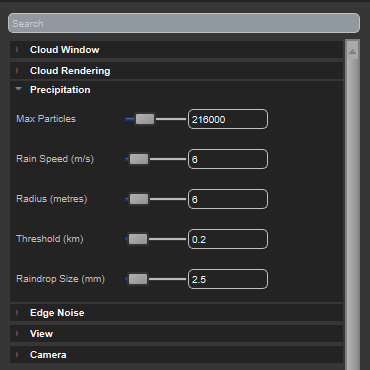
After applying some styling, the final result looks like this:

The accordion elements - Cloud Window, Precipitation etc are inside a searchable property panel, implemented on the same principles.

And here are the files for the final class:

QAccordion.zip

Saturday, 20 May 2017

Sfx: a generic effect compiler for shaders

So Microsoft, Nvidia and the rest used to support effect files: a text source file that contained multiple shaders, but also "techniques" and "passes", where each pass can have state specified: blending, rasterization etc.

Some time ago, for reasons I guess of supply and demand, fx fell out of fashion. Microsoft still provides the D3D11 version of its Effects library as open source here, and this reads binary output that the fxc tool can create. But Fxc is being replaced by by this, which doesn't support effects. Nvidia's Tristan Lorach proposed a new framework, nvFX (pdf), but I don't think it's under active development.

D3D12 has no effect support. So we need to add it.

My approach at Simul is called Sfx. The idea is to take an initial file that's compatible with Microsoft's HLSL effect format, with the code written in HLSL. Sfx will extract the passes and compile all the relevant shaders by building smaller individual shader source files and calling an external compiler. A small json file will specify which compiler to use, and various other parameters to allow translation from HLSL to whatever language the compiler expects.

For example, HLSL.json looks like:

{
  "compiler": "C:/Program Files (x86)/Windows Kits/10/bin/x64/fxc.exe",
  "defaultOptions": "/T {shader_model} /nologo",
  "sourceExtension": "hlsl",
  "outputExtension": "cso",
 "outputOption": "/Fo",
 "entryPointOption":  "/E{name}",
  "multiplePixelOutputFormats": false
}

So Sfx should be compiler-independent. It outputs two things: a text file with the .sfxo extension, and a number of platform-specific shader binaries. The sfxo looks like this:

SFX
texture fontTexture 2d read_only 0 single
SamplerState clampSamplerState 9,LINEAR,CLAMP,CLAMP,CLAMP,
SamplerState cmcNearestSamplerState 13,POINT,CLAMP,MIRROR,CLAMP,
RasterizerState RenderNoCull (false,CULL_NONE,0,0,false,FILL_SOLID,true,false,false,0)
RasterizerState wireframeRasterizer (true,CULL_NONE,0,0,false,FILL_WIREFRAME,false,false,false,0)
BlendState AlphaBlendRGB false,(true),1,1,4,5,0,0,(7)
DepthStencilState DisableDepth false,0,4
group 
{
 technique backg
 {
  pass p0
  {
   rasterizer: RenderNoCull
   depthstencil: DisableDepth 0
   blend: AlphaBlendRGB (0,0,0,0) 4294967295
   vertex: font_FontVertexShader_vv.cso,(),(),()
   pixel: font_FontPixelShader.cso,(),(),()
  }
 }
}

This stands to improve over time. In this case, we've taken an sfx file containing this definition:

VertexShader vs = CompileShader(vs_4_0, FontVertexShader());
technique text
{
    pass p0
    {
  SetRasterizerState( RenderNoCull );
  SetDepthStencilState( DisableDepth, 0 );
  SetBlendState(AddBlendRGB,vec4( 0.0, 0.0, 0.0, 0.0), 0xFFFFFFFF );
         SetGeometryShader(NULL);
  SetVertexShader(vs);
  SetPixelShader(CompileShader(ps_4_0,FontPixelShader()));
    }
}


so we've compiled FontPixelShader() and FontVertexShader() into the cso files: this example is for HLSL. As we extend Sfx to other languages, the json definition in particular will become more complex - possibly using regexes to specify how HLSL is translated into other C-style shader languages.

Thursday, 18 May 2017

HDR output in Unreal Engine

To get Unreal Engine to output from consoles in HDR format (i.e. to HDR TV's), there are a few settings. according to this post, there are variables that can go in the .ini files. But in my experience, setting EnableHDROutput to 1 in Engine.ini, causes UE to crash on initialization. As of May 2017, the solution seems to be to either enter the hdr settings every time via the console, or use the Blueprint function EnableHDRDisplayOutput:


This seems to also cover the r.HDR.Display.OutputDevice and r.HDR.Display,ColorGamut settings, so one call will do it.

Sunday, 16 April 2017

cldoc - a promising documentation generator

cldoc needs Python 2, and won't yet work with Python 3. You have to make sure it's at least Python 2.7.9 so that you get pip.exe, which will be needed to install various extras. After installing Python 2, run:

python -m ensurepip --upgrade

to get pip, then:

pip install pyparsing

You might have to do this from C:\Python27\Scripts. If you don't want to replace your Python 3 setup in Path and PYTHONPATH, just calling "pip install", even from the Python 2 directory, will run the pip for Python 3.

You may need the latest Clang: older versions don't all have full support for C++14 features on Windows. http://releases.llvm.org/download.html


Create a Sublime Text build system, called cldoc.sublime-build, and fill it with:
{
 "cmd": ["C:\\Python27\\python.exe","C:\\PATH TO\\cldoc-dev","generate","--","--output","C:/PATH TO/docout","C:/PATH TO/*.h"]
 ,"env": {"PYTHONPATH":"C:\\Python27"}
 ,"working_dir":"C:\\Python27"
,"file_regex": "^(.*)\\:([0-9]*)\\:([0-9]*)\\:"
}

Testing the docs in Windows

To test the documentation website on Windows, you must install Jekyll. Follow the instructions. Watch out for the SSL errors. Once you have jekyll on your Windows machine, you can go to the site directory and call e.g.:
jekyll build --incremental --destination G:/

That destination part is because the links to css files etc start with a slash. So the only way you can test this locally is if the site is at the root of some directory.
Create a small partition on your local drive, and put the site there.

.htaccess for XAMPP:


Options +FollowSymLinks -MultiViews
RewriteEngine On
RewriteBase /
RewriteCond %{REQUEST_URI} !-f
RewriteRule ^([a-zA-Z0-9_-]+)$ $1.html 

Thursday, 17 November 2016

Flex/Bison error lines compatible with Visual Studio

Flex and Bison can be built from source, to be found at github.com/AaronNGray/winflexbison. To get errors and warnings that you can double-click in Visual Studio, you can modify the code as follows:

In the file bison\src\location.c, find the function unsigned location_print (location loc, FILE *out) - and replace it with:

unsigned
location_print (location loc, FILE *out)
{
  unsigned res = 0;
  int end_col = 0 != loc.end.column ? loc.end.column - 1 : 0;
  res += fprintf (out, "%s",
                  quotearg_n_style (3, escape_quoting_style, loc.start.file));
  if(0 <= loc.start.line||loc.start.file != loc.end.file||0 <= loc.end.line)
      res += fprintf (out, "(");
  if (0 <= loc.start.line)
    {
      res += fprintf (out, "%d", loc.start.line);
      if (0 <= loc.start.column)
        res += fprintf (out, ",%d", loc.start.column);
    }
  if (loc.start.file != loc.end.file)
    {
  // Ignore: Visual Studio can't cope with this case.
    }
  if(0 <= loc.start.line||loc.start.file != loc.end.file||0 <= loc.end.line)
      res += fprintf (out, ")");
  return res;
}
That fixes it for Bison. For Flex, in flex/src/parse.c, change the function line_pinpoint( str, line ) to
void line_pinpoint( str, line )
const char *str;
int line;
 {
 fprintf( stderr, "%s(%d): %s\n", infilename, line, str );
 }

My branch incorporating these changes is here.

Tuesday, 8 November 2016

Using Sublime Text with FASTBuild

Sublime text can be used to run FASTBuild, with this build script. Save this as "FASTBuild.sublime-build", in your user AppData\Roaming\Sublime Text 3\Packages\User directory (or Mac/Linux equivalent location).
{
 "cmd": ["C:/Simul/master/Simul/External/FASTBuild/FBuild.exe","-config","$file"]
 ,"file_regex": "(.*)\\((.*),(.*)\\): FASTBuild (Error .*)$"
 ,"selector": "source.bff"
}
By using the selector "source.bff", it should match up automatically with the syntax (below), but I've not quite figured this part out yet. Here's a preliminary Sublime Text syntax for FASTBuild. Call it "FASTBuild.sublime-syntax" and save it in the same directory.

%YAML 1.2
---
name: FASTBuild
file_extensions: [bff]
scope: source.bff

contexts:
  comments:
    - include: scope:source.c#comments

  instring:
    - match: "[^\"]"
      scope: string
    - match: \"
      pop: true
      scope: string
  strings:
    - match: \"
      push: instring
      scope: string

  inquotes:
    - match: "[^']"
      scope: string
    - match: "'"
      pop: true
      scope: string
  quotes:
    - match: "'"
      push: inquotes
      scope: string

  variables:
    - match: "\\.(\\w*)"
      scope: keyword
  preprocessor-includes:
    - match: "^\\s*(#\\s*\\binclude)\\b"
      captures:
        1: keyword.control.include.c++
  preprocessor-import:
    - match: "^\\s*(#)\\s*\\b(import)\\b"
      scope: keyword.control.c

  preprocessor:
    - include: scope:source.c#incomplete-inc
    - include: preprocessor-macro-define
    - include: scope:source.c#pragma-mark
    - include: preprocessor-includes
    - include: preprocessor-import
  global:
    - include: comments
    - include: preprocessor
    - include: strings
    - include: quotes
    - include: variables
  main:
    - include: global
    - match: \b(if|else|for|while)\b
      scope: keyword.control.c
      

Tuesday, 9 August 2016

Qt oddness within Unity

I've noticed some very strange behaviour when launching a Qt-based UI from Unity recently. Possibly from updating Qt, but the UI would fail to respond to mouse clicks or other signals, until I dragged or resized the window, at which point, all the inputs I had made would then replay very quickly and get up to date.
The only solution I've found is to create a QTimer outside of the main window context (the QApplication is its owner), and set it to call QCoreApplication::processEvents every 100ms or so.

QTimer *timer=new QTimer(pApp);
timer->setSingleShot(false);
timer->start(100);
CONNECT_AUTO(timer,SIGNAL(timeout()),w,SLOT(Idle()));

Saturday, 30 July 2016

Units for Physically Based Rendering

Physically-based rendering (PBR) should really use physical units, though many PBR engines don't.


Sunlight is typically described as being in watts per square metre. But that represents the energy across the entire spectrum, and has no concept of colour.

So for PBR, the units for directional light, e.g. sunlight are watts per square metre per nanometre.

Sunlight comes from so far away that the direction of the light is essentially parallel. But a local light source like a light bulb emits its energy in all directions.

So the irradiance due to a light bulb varies with distance from the bulb. If the total spectral power of the bulb, P (the spectral flux), is measured in watts per nanometre (for any given colour on the spectrum), suppose that the bulb has a radius of r metres, and thus a surface area of $4 \pi r^2$ square metres. Then the irradiance, at the surface, will be $I=P/ (4 \pi r^2) w/m^2/nm$, in the same units as sunlight.

But away from the bulb, at distance R, the same power passes through a larger surface area. So again, $I = P / (4 \pi R^2)$, where P is the same total spectral power as before.

Thus $I(R) = I(r) (\frac{r}{R})^2$ - the irradiance follows an inverse-square power law.

So we don't use irradiance to measure point lights. If the light is uniformly distributed by direction, we can use spectral flux P, watts/nm.

the radiance at any point is given in watts per steradian per nm, where there are 4pi steradians across the entire sphere.

Rendering

The challenge with rendering is to recreate (on a lcd monitor, cinema screen, or in print) the radiance that the you would perceive if you were really looking at the thing the image represents.
Imagine you want to create the experience of flying at ten thousand feet. It looks something like this:
photo at 10,000 feet altitude
trueSKY render at 10,000 feet altitude

But in rendering we don't (necessarily) want to recreate what the photo or video of something would look like: that's actually a more complex problem. The fundamental challenge of rendering is to see if we can recreate the real thing. Consider one point in the image, perhaps part of the sky. The light from that point that the eye would perceive is defined by a spectrum, like this:
and the way the human eye would perceive it is defined by the response of its three types of cone (ignoring rods for now - those are for night-vision).

The three cone types correspond only roughly to red green and blue, and they overlap considerably. So they are called X, Y and Z. These functions, mapped by the CIE, don't describe a precise physiological response in the eye - but they do allow us to match perceived colours from different sources as the eye sees them. Having these functions, we can calculate three responses:

$X= \int_{\lambda} f_x(\lambda) E(\lambda) d\lambda $
$Y= \int f_y E$
$Z= \int f_z E$

X, Y and Z are the three numbers we want to reproduce.
Now monitors have red, green, and blue elements to each pixel, and the wavelengths of these are pretty sharply concentrated. They're not single-frequency spikes like lasers, but they're clearly separated.
So in the "true" image we had one continuous spectrum, but the monitor gives out three distinct colours. You can calibrate your monitor to get its exact curves (see e.g. here) although the calibration will only be valid until you adjust the monitor's settings.

We would like to reproduce the same three X, Y, and Z values as above: that will make the colour and brightness of the point/pixel look the same as reality to the eye.

Of course, the eye response curves are meant to represent the typical human eye. If your eyes don't match the standard curves - for example, if you're colour blind - that assumption is invalid, and the two radiances won't look the same to you.

$X= \int f_x E_m$
$Y= \int f_y E_m$
$Z= \int f_z E_m$

where $E_m$ is the monitor spectral radiance, which is a combination of what the red, green, and blue elements are putting out:

$E_m(\lambda)=R_m(\lambda)+G_m(\lambda)+B_m(\lambda)$

At any given $\lambda$, we expect at most one of those values to be significant.

So for a known spectral radiance distribution, we solve for Rm, Gm and Bm:

$\int f_x E = \int f_x (R_m+G_m+B_m)$
$\int f_y E = \int f_y (R_m+G_m+B_m)$
$\int f_z E = \int f_z (R_m+G_m+B_m)$

Note we can't simply say

$\int f_x E = \int f_x B_m$

etc. X, Y and Z are not exactly blue, green and red. More like blue, yellowy-green, and greeny-yellow-violet. Our eyes know how to interpret the infinite combinations of cone responses into colour and brightness.

Let's assume that the spectral profile of our monitor is known, and that generally:

$R_m(\lambda)=R \times m_R(\lambda)$

where R is the brightness, from zero to one, of the red part of the pixel, and $m_R$ is a known function for the monitor.

\begin{align}
\int f_x E &= \int f_x (R m_R+G m_G+B m_B) \\
 &=R \int f_x m_R + G \int f_x m_G + B \int f_x m_B \\
 \end{align}

So knowing the eye functions $f_x$ etc., and the monitor functions $m_R$ etc, the right-hand-side integrations can be precalculated, leaving us with:

\begin{align}
\int f_x E &= R I_xR + G I_xG + B I_xB \\
\int f_y E &= R I_yR + G I_yG + B I_yB \\
\int f_z E &= R I_zR + G I_zG + B I_zB \\
 \end{align}

This is a 3x3 matrix equation: linear algebra.

\begin{align}
c &= M c_m
\end{align}

where c is the vector of three "ground truth" integrals, $c_m$ is the vector of three monitor rgb values (assuming a linear monitor - more on this later), and $M$ is the monitor-eye matrix, which is constant for a given monitor and viewer.

While X is kind-of blue, and Z is kind-of red, we can't really regard any of the integral constants that make up M as being close enough to zero to be negligible, except for maybe $I_xR$. We'll leave it in for now. We must get the matrix inverse of M to solve for $c_m$. If we knew the shape of $E(\lambda)$ through the whole spectrum, and assuming we have all the monitor data, and assuming we have a viewer with typical human eyes, we'd be able to calculate the exact $c_m$, the exact RGB values to send to the monitor that will reproduce the ground truth view. We would have to hope, as well, that when we've found $c_m$, none of its members are greater than 1.0. Because monitors have low dynamic range, for now, we can't represent many of the brightness values that in real life we encounter every day.

Much of the above must be taken on trust, or worked around. But what do we know about c? We probably haven't calculated the entire spectral radiance curve for the visual spectrum, for each pixel onscreen. We've probably calculated three values. Again, red, green, and blue. And we must make an assumption about how those three numbers approximate the full spectrum.

Suppose we assume that each of our three calculated values represents a range of the spectrum over which the spectral radiance is constant:

We can refine this later with a better shape. But our three columns roughly approximate the full spectrum, and they allow us to calculate $c$ as follows:


\begin{align}
c_x &= \int f_x E_d \\
c_y &= \int f_y E_d \\
c_z &= \int f_z E_d \\
 \end{align}

where $E_d$ is our rendered sr curve, which is:

\begin{align}
E_d &= R_d (r_0 \le \lambda < r_1) \\
&= G_d (g_0 \le \lambda < g_1) \\
&= B_d (b_0 \le \lambda < b_1) \\
 \end{align}

where $R_d$ etc are the rendered spectral radiances. So we can now calculate $c$, or at least $c_d$, the rendered approximation to the ground truth. And finally:

$c_m = M^{-1} $c_d


Tuesday, 12 July 2016

Qt's QProcessEnvironment cannot be used to change the current environment.

http://doc.qt.io/qt-4.8/qprocessenvironment.html

Sadly, and obscurely, Qt's QProcessEnvironment can't change the running environment. If you call QProcessEnvironment::systemEnvironment(), that returns the current environment by value. Any changes you make to the returned object are discarded. You must instead use _putenv() to change environment variables.

Saturday, 18 June 2016

Cubemap Texture Arrays

So in modern graphics API's: Direct3D 11 and 12, OpenGL 4.0 and so on, we can create 2D textures, textures with multiple mipmaps, arrays of textures with multiple mipmaps, and so on. Most don't yet support arrays of 3D textures.

But one little-used combination that is supported, is a texture cube array. That's a single texture, which is an array of cubemaps, which optionally have mip levels as well.

In Direct3D 11, this involves creating a 2D texture using D3D11_TEXTURE2D_DESC struct, where arraySize is six times the number of cubemaps.

Then, when you create the shaderResourceView, you'll use a D3D11_SHADER_RESOURCE_VIEW_DESC with ViewDimension equal to D3D11_SRV_DIMENSION_TEXTURECUBEARRAY.

You'll fill in the TextureCubeArray member of that struct's union, e.g.
 SRVDesc.ViewDimension    =D3D11_SRV_DIMENSION_TEXTURECUBEARRAY;
 SRVDesc.TextureCubeArray.MipLevels  =numMips;
 SRVDesc.TextureCubeArray.MostDetailedMip =0;
 SRVDesc.TextureCubeArray.First2DArrayFace =0;
 SRVDesc.TextureCubeArray.NumCubes  =numLevels;

Thursday, 5 May 2016

Versioning SDK's with Git for builds with Jenkins

Alright I think I've finally figured out a way to build SDK's with versioning.

Git for source control, obviously.

Development happens on the "master" branch. There's a "dev" branch for experimental stuff.
About every other month, I'll create a numbered branch. I've started with 4.0 because it continues from the old versioning system.

Each numbered branch receives only bug-fixes. All feature changes go in the master branch.

Jenkins gets a list of versions to build, defined in the main Jenkins Config as an environment variable. At the moment is looks like this:


Using Jenkins' Dynamic Axis Plugin and Matrix Projects, I use this as an axis for the matrix builds. Over time, new project numbers will be added and older ones will drop off. Jenkins will add build numbers to the version numbers, so I'll end up with installers numbered 4.0.125 etc.

Because only bug-fixes go in numbered branches, higher build numbers will always be more stable. And once you've chosen a numbered branch for your project, you can stick with that number, report to us any bugs, and be confident that the fixes will go in without any new breaking changes.

And I can develop freely on the master branch without worrying about breaking the versions in use by customers.

This should work. I'm probably the last person to figure this out.

Tuesday, 26 April 2016

Using curl in Windows to download files

This downloads a file if it's newer than the one that's on your local drive:

curl -z "path\filename.lib" ftp://ftp.yoursite.com//ftppath/filename.lib -o "path\filename.lib"

The "-z" means only copy if it's newer than a specified date. But then you just put the filename, meaning that curl should use the date of that file.
If the file doesn't exist locally, you'll get a warning about "invalid date or not a file". This can be ignored.
The "-o" means download it to the local file specified (same filename as for -z), instead of just outputting it to the console.

Monday, 29 February 2016

Problem with handling HTML form checkboxes in php

php doesn't handle checkboxes properly in html forms. If you use

My Checkbox <input type="checkbox" name="my_checkbox" id="my_checkbox"'.($current_value?'checked':'').' />

You'll only get a result for isset($_REQUEST['my_checkbox']) if the box is *checked*, not if it's cleared. So you can't test for whether the box was unchecked by the user, because using !isset would be the same whether the page was just loaded, or if the form was submitted with the box unchecked by user input.

The solution from Stack Overflow:

Every checkbox generated is associated with a hidden field of the same name, placed just before the checkbox, and with a value of "0".

<input name="my_checkbox" type="hidden" value="0" />
<input name="my_checkbox" type="checkbox" value="1" />


Then isset($_REQUEST['my_checkbox']) always returns true if the box was modified, and false if the page was just loaded. And you'll always get the correct '0' or '1' value in $_REQUEST['my_checkbox'].